> ## Documentation Index
> Fetch the complete documentation index at: https://sequence-0fb8d9e6-api_docs.mintlify.site/llms.txt
> Use this file to discover all available pages before exploring further.
# Custom Configuration Options
> The Configuration section allows developers to customize the Web SDK by passing options to the `SequenceConnect` wrapper.
Developers can customize the Web SDK experience by passing configuration options to the `SequenceConnect` wrapper.
Here's how you can configure the kit using these options:
```jsx theme={null}
const connectConfig = {
defaultTheme: 'light',
position: 'top-left',
...
}
```
## Configuration Overview
The following is the available configuration customization options, or, [see below for all the options in-depth](/sdk/web/wallet-sdk/embedded/custom-configuration#available-options):
```typescript theme={null}
interface CreateConfigOptions {
appName: string
projectAccessKey: string
chainIds?: number[]
defaultChainId?: number
disableAnalytics?: boolean
defaultTheme?: Theme
position?: ModalPosition
signIn?: {
logoUrl?: string
projectName?: string
useMock?: boolean
}
displayedAssets?: Array<{
contractAddress: string
chainId: number
}>
ethAuth?: EthAuthSettings
wagmiConfig?: WagmiConfig // optional wagmiConfig overrides
waasConfigKey: string
enableConfirmationModal?: boolean
walletConnect?:
| boolean
| {
projectId: string
}
google?:
| boolean
| {
clientId: string
}
apple?:
| boolean
| {
clientId: string
rediretURI: string
}
email?:
| boolean
| {
legacyEmailAuth?: boolean
}
X?:
| boolean
| {
clientId: string
redirectURI: string
}
guest?: boolean
additionalWallets?: any[]
}
```
## Custom Styling and Design
You can customize the visual appearance of Web SDK connect modal by providing a custom theme object to the `defaultTheme` configuration option. Here's an example of how to implement custom styling:
```typescript theme={null}
import { createConfig } from "@0xsequence/connect";
const CUSTOM_THEME = {
backgroundPrimary: "rgba(35, 100, 32, 1)",
backgroundSecondary: "navy",
};
export const config = createConfig("waas", {
projectAccessKey: projectAccessKey,
defaultTheme: CUSTOM_THEME,
// ... other config options
});
```
### Available Theme Variables
The following theme variables can be customized:
```typescript theme={null}
// Text Colors
text100: string; // 'rgba(255, 255, 255, 1)'
text80: string; // 'rgba(255, 255, 255, 0.8)'
text50: string; // 'rgba(255, 255, 255, 0.5)'
textInverse100: string; // 'rgba(0, 0, 0, 1)'
// Background Colors
backgroundPrimary: string; // 'rgba(0, 0, 0, 1)'
backgroundSecondary: string; // 'rgba(255, 255, 255, 0.1)'
backgroundContrast: string; // 'rgba(0, 0, 0, 0.5)'
backgroundMuted: string; // 'rgba(255, 255, 255, 0.05)'
backgroundControl: string; // 'rgba(255, 255, 255, 0.25)'
backgroundInverse: string; // 'rgba(255, 255, 255, 1)'
backgroundBackdrop: string; // 'rgba(34, 34, 34, 0.9)'
backgroundOverlay: string; // 'rgba(0, 0, 0, 0.7)'
backgroundRaised: string; // 'rgba(54, 54, 54, 0.7)'
// Button Colors
buttonGlass: string; // 'rgba(255, 255, 255, 0.15)'
buttonEmphasis: string; // 'rgba(0, 0, 0, 0.5)'
buttonInverse: string; // 'rgba(255, 255, 255, 0.8)'
// Border Colors
borderNormal: string; // 'rgba(255, 255, 255, 0.25)'
borderFocus: string; // 'rgba(255, 255, 255, 0.5)'
```
You can override any combination of these variables to create your custom theme. The values can be provided in any valid CSS color format (rgba, hex, named colors, etc.).
# Available Options
## Sequence App Development
### `appName`
| Type | Default |
| ------ | --------- |
| string | undefined |
An internal software naming value that is not presented to the user.
### `projectAccessKey`
| Type | Default |
| ------ | --------- |
| string | undefined |
The project access key that is required, obtained from [Sequence Builder](https://sequence.build)
### `ethAuth` as EthAuthSettings
```typescript theme={null}
{
/*app name*/
app?: string
/** expiry number (in seconds) that is used for ETHAuth proof. Default is 1 week in seconds. */
expiry?: number
/** origin hint of the dapp's host opening the wallet. This value will automatically
* be determined and verified for integrity, and can be omitted. */
origin?: string
/** nonce is an optional number to be passed as ETHAuth's nonce claim for replay protection. **/
nonce?: number
}
```
### `waasConfigKey`
| Type | Default |
| ------ | --------- |
| string | undefined |
The Embedded Wallet configuration key required for WaaS wallets, configured within the [Sequence Builder](https://sequence.build).
## Network
### `chainIds`
| Type | Default |
| --------- | --------- |
| number\[] | undefined |
A list of chain Ids. e.g. \[1, 137]
### `defaultChainId`
| Type | Default |
| ------ | --------- |
| number | undefined |
The chain Id that is first used for signatures and transactions.
## UI
User Interface based parameters that augment the modal interface.
### Sign In Modal Configuration (`signIn`)
The `signIn` object is used to configure the sign in modal.
#### `signIn.logoUrl`
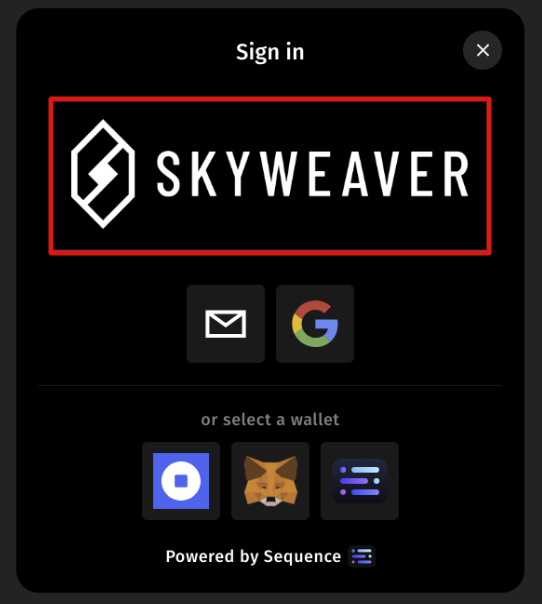 | Type | Default |
| ------ | --------- |
| string | undefined |
URL of the logo to be shown in the sign in modal.
#### `signIn.projectName`
| Type | Default |
| ------ | --------- |
| string | undefined |
URL of the logo to be shown in the sign in modal.
#### `signIn.projectName`
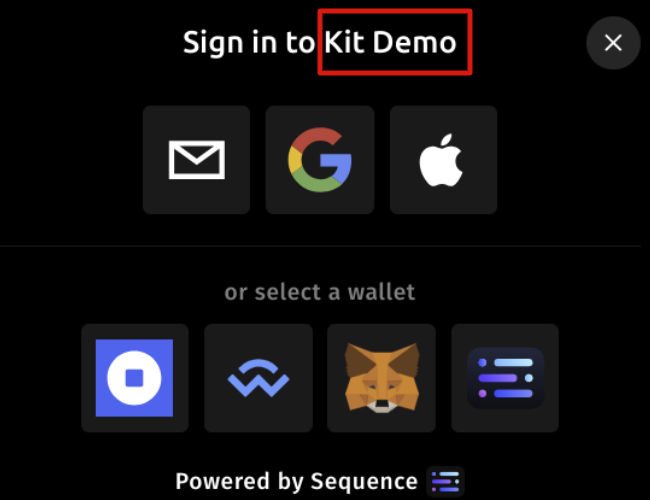 | Type | Default |
| ------ | --------- |
| string | undefined |
Name of the project to be shown in the sign in modal.
#### `signIn.useMock`
| Type | Default |
| ------- | --------- |
| boolean | undefined |
Removes the ability to make live blockchain requests if set to `true` by using the [wagmi mock connector](https://wagmi.sh/core/api/connectors/mock#mock)
### `position`
| Type | Default |
| ------ | ------- |
| string | center |
The position parameter determines the location of the various modals on the screen. Possible values include:
* center
* middle-right
* middle-left
* top-center
* top-right
* top-left
* bottom-center
* bottom-right
* bottom-left
### `defaultTheme`
| Type | Default |
| ---------------- | ------- |
| string or object | dark |
The defaultTheme determines the color palette used for styling the modal. Possible values include:
* 'light'
* 'dark'
* object
Specific colors can be overwritten by passing a theme override object. The [Sequence Builder](https://sequence.build/) provides a useful playground for toying with the colors in Web SDK.
## Wallet
Parameters that entail wallet configuration options
### `disableAnalytics`
| Type | Default |
| ------- | --------- |
| boolean | undefined |
Turning on and off the analytics feature that is connected to your [Sequence Builder](http://sequence.build) project.
### `displayedAssets`
| Type | Default |
| ----------------------------------------------------- | --------- |
| \[\{ contractAddress: string, chainId: number }, ...] | undefined |
If provided, this will determine which assets are to be displayed in the in-game wallet modal main view.
By passing a list of displayed assets, only assets from the provided list will be displayed in the main view.
In the case that no assets are provided, all owned assets can be displayed in the main view.
### `enableConfirmationModal`
| Type | Default |
| ------- | --------- |
| boolean | undefined |
Enable confirmations for when sending transaction
## Sign in providers
The various sign in providers that create wallet connections for the user:
### `walletConnect`
| Type | Default |
| ---------------------------------- | ----------- |
| `false` \| `{ projectId: string }` | `undefined` |
### `google`
| Type | Default |
| --------------------------------- | ----------- |
| `false` \| `{ clientId: string }` | `undefined` |
### `apple`
| Type | Default |
| ------------------------------------------------------ | ----------- |
| `false` \| `{ clientId: string, redirectURI: string }` | `undefined` |
### `email`
| Type | Default |
| ------------------------------------------- | ----------- |
| `boolean` \| `{ legacyEmailAuth: boolean }` | `undefined` |
# Create Universal Default Connectors
While we generally recommed using Embedded Wallets with SequenceKit, as an alternative, you can also use leverage our Universal Wallet configuration. When creating a wagmi `connectors` variable, import the `getDefaultConnectors` function from the `@0xsequence/kit` package, and include a Wallet Connect ID obtained from [here](https://cloud.walletconnect.com/app), a default chain ID, app name, and the `projectAccessKey`, then [continue with the integration from the quickstart](/sdk/web/wallet-sdk/embedded/getting-started).
```typescript [config.ts] theme={null}
import { getDefaultConnectors } from '@0xsequence/kit'
...
export const projectAccessKey = ''
const connectors = getDefaultConnectors( "universal", {
walletConnectProjectId: 'wallet-connect-id',
defaultChainId: 1,
appName: 'demo app',
projectAccessKey
})
export const config = createConfig({
transports,
connectors,
chains
})
```
| Type | Default |
| ------ | --------- |
| string | undefined |
Name of the project to be shown in the sign in modal.
#### `signIn.useMock`
| Type | Default |
| ------- | --------- |
| boolean | undefined |
Removes the ability to make live blockchain requests if set to `true` by using the [wagmi mock connector](https://wagmi.sh/core/api/connectors/mock#mock)
### `position`
| Type | Default |
| ------ | ------- |
| string | center |
The position parameter determines the location of the various modals on the screen. Possible values include:
* center
* middle-right
* middle-left
* top-center
* top-right
* top-left
* bottom-center
* bottom-right
* bottom-left
### `defaultTheme`
| Type | Default |
| ---------------- | ------- |
| string or object | dark |
The defaultTheme determines the color palette used for styling the modal. Possible values include:
* 'light'
* 'dark'
* object
Specific colors can be overwritten by passing a theme override object. The [Sequence Builder](https://sequence.build/) provides a useful playground for toying with the colors in Web SDK.
## Wallet
Parameters that entail wallet configuration options
### `disableAnalytics`
| Type | Default |
| ------- | --------- |
| boolean | undefined |
Turning on and off the analytics feature that is connected to your [Sequence Builder](http://sequence.build) project.
### `displayedAssets`
| Type | Default |
| ----------------------------------------------------- | --------- |
| \[\{ contractAddress: string, chainId: number }, ...] | undefined |
If provided, this will determine which assets are to be displayed in the in-game wallet modal main view.
By passing a list of displayed assets, only assets from the provided list will be displayed in the main view.
In the case that no assets are provided, all owned assets can be displayed in the main view.
### `enableConfirmationModal`
| Type | Default |
| ------- | --------- |
| boolean | undefined |
Enable confirmations for when sending transaction
## Sign in providers
The various sign in providers that create wallet connections for the user:
### `walletConnect`
| Type | Default |
| ---------------------------------- | ----------- |
| `false` \| `{ projectId: string }` | `undefined` |
### `google`
| Type | Default |
| --------------------------------- | ----------- |
| `false` \| `{ clientId: string }` | `undefined` |
### `apple`
| Type | Default |
| ------------------------------------------------------ | ----------- |
| `false` \| `{ clientId: string, redirectURI: string }` | `undefined` |
### `email`
| Type | Default |
| ------------------------------------------- | ----------- |
| `boolean` \| `{ legacyEmailAuth: boolean }` | `undefined` |
# Create Universal Default Connectors
While we generally recommed using Embedded Wallets with SequenceKit, as an alternative, you can also use leverage our Universal Wallet configuration. When creating a wagmi `connectors` variable, import the `getDefaultConnectors` function from the `@0xsequence/kit` package, and include a Wallet Connect ID obtained from [here](https://cloud.walletconnect.com/app), a default chain ID, app name, and the `projectAccessKey`, then [continue with the integration from the quickstart](/sdk/web/wallet-sdk/embedded/getting-started).
```typescript [config.ts] theme={null}
import { getDefaultConnectors } from '@0xsequence/kit'
...
export const projectAccessKey = ''
const connectors = getDefaultConnectors( "universal", {
walletConnectProjectId: 'wallet-connect-id',
defaultChainId: 1,
appName: 'demo app',
projectAccessKey
})
export const config = createConfig({
transports,
connectors,
chains
})
```